Snag in CarPlay cheat sheet
Voice first, nothing to read while you drive. iOS 26.4 or later. How it works · CarPlay help
Waiting on you (Pro)
A mockup of the car screen, not a screenshot.
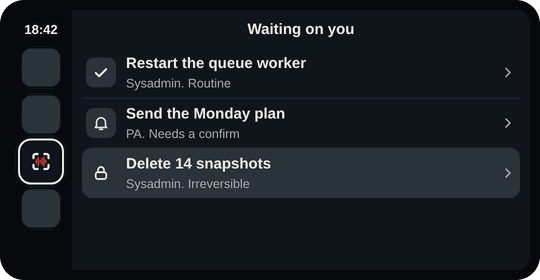
- Snag on the car screen.
- Waiting on you: Snag says how many.
- Routine: tap, then Approve or Hold.
- Needs a confirm: approve by voice or tap, as your rule allows.
- Irreversible: parked for Face ID on the phone.
The list
| Row | Does |
|---|---|
| Snag this | Capture by voice. Free |
| Ask an agent | A question or a job (Pro) |
| Waiting on you | Approvals (Pro) |
| Parked | What needs a screen (Pro) |
Opening Snag starts listening straight away.
What to say
| Say | Does |
|---|---|
| add more, done | Carry on, or save |
| Ops, how did the backup go? | Ask an agent |
| anything need me | What's waiting |
| approve, hold | Decide the one read out |
| more, park it | Hear more, or save it for later |
The code word
- Tap the item, then Approve.
- Snag asks "Your code word?".
- Say the two words, once.
- Approved, or Parked.
Set it on the phone: Settings > Approvals > Code word. It is never said back or shown.
The car never
- Shows an answer's words or the code word.
- Approves by silence, a mishear or an expired approval.
- Approves what needs Face ID.
- Sells anything or shows a price.
A passenger can tap I'm a passenger on the phone.