Snag desktop for Linux
Snag desktop
A timer in your bar, and a keybind to capture whatever's on your mind. Built for Omarchy and Hyprland first.
A timer that lives in your bar
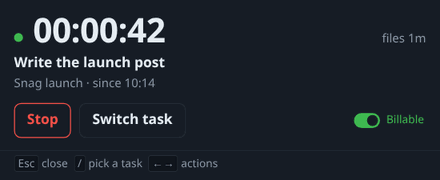
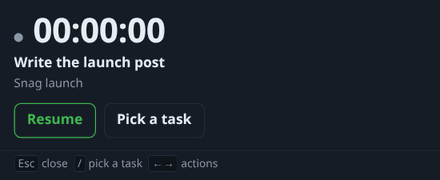
Snag puts a timer in your Waybar status line or your tray. Start, stop and toggle it from a keybind or the CLI.
It counts across suspend, so a closed lid isn't lost time.
Quick capture from a keybind
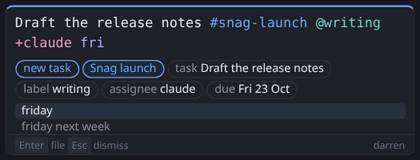
Bind snag capture to a key (on Omarchy, Super+Q works well). Press it, type a task or a note, and you're done.
Type #project, @label or +person, or a date word like tom, fri or next week. Press Tab to complete it. A capture with no project goes to your default project.
Idle that asks, not guesses
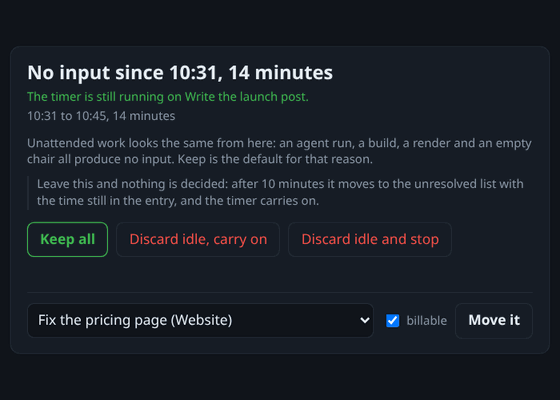
After a break, Snag asks what to do with the time. Keep it, drop it, or move it to another task.
Nothing is discarded silently.
Works offline
With no connection, Snag queues what you do and syncs when you're back. Your workspace keeps the totals.
A CLI for everything
Everything the bar and the keybinds do, the snag command does too.
snag status
snag start
snag stop
snag toggle
snag capture
snag doctor
snag tasks
snag retrostatusshows the timer.start,stopandtogglerun it.captureopens the quick-capture window.doctorsays what this machine supports.tasksprints JSON, for a bar or a script.retrosuggests time entries from your git history. It's a dry run by default.
This is the real output:
$ snag status
Running, 0:42 - Write the launch post (Snag launch).
$ snag stop
Stopped.
Activity observation is optional
It's off by default, and it's local.
See what it recorded with snag observed. Delete it with snag forget.
snag observed
snag forget
It records and nothing more. It doesn't track your time for you.
Built for Omarchy first
Snag desktop is built for Omarchy and Hyprland first. Run snag doctor to see what your machine supports.
Snag desktop for Mac
Snag desktop for Mac: a menu-bar app for Apple silicon, with a small group of testers.
Want to try it? Email hello@snag.fm.
Questions
Does it track my time for me?
No. You start and stop the timer, from the bar, a keybind or the CLI. Activity observation is off by default and only records.
What if I close the lid?
The timer counts across suspend, so that time is still there. When you're back, Snag asks what to do with it if you were idle.
What if I'm offline?
Snag queues what you do and syncs when you're back online.