Snag for iPhone cheat sheet
Capture it, send it where you work, run your agents. How it works · Snag help
The Capture tab
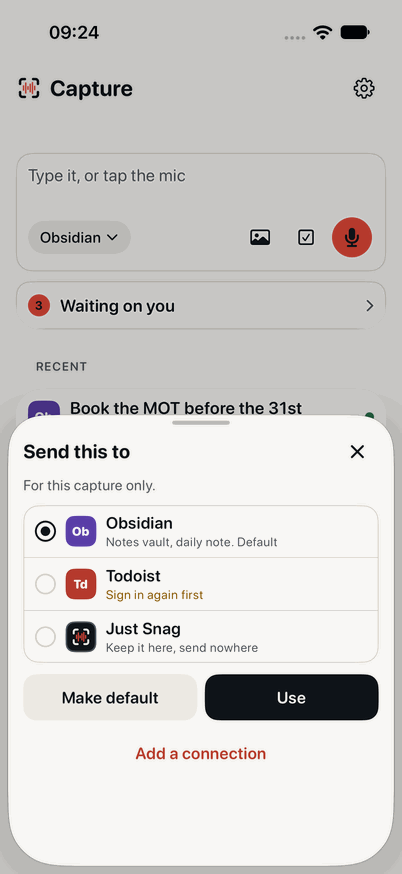
- The capture card: type it, or tap the mic.
- Send to: where this one capture goes.
- Add a photo or a file.
- Make it a task, with a due date and project.
- The mic. Tap stop to edit, or Send now.
- Waiting on you: an agent needs you (Pro).
- Send this to: Use for this capture, or Make default.
The Control tab (Pro)
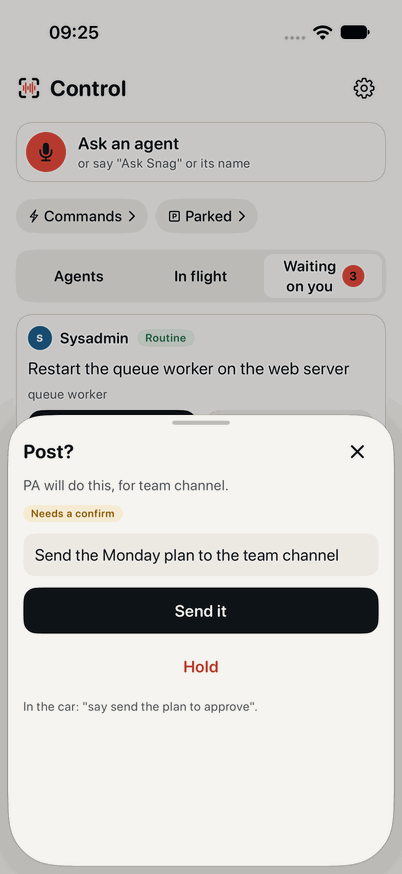
- Ask an agent: tap, or say Ask Snag or its name.
- Your voice commands.
- Parked: what waits for a screen.
- Agents, In flight, and Waiting on you.
- An approval that needs a confirm.
- Approve it, or Hold. Silence never approves.
Say to Siri
| Say | Does |
|---|---|
| Hey Siri, snag this | Capture, hands-free |
| Hey Siri, stop Snag | Stop and keep it |
| Hey Siri, note in Snag | A text note |
| Hey Siri, add a task in Snag | A task where tasks go |
| Hey Siri, ask Snag | Ask an agent (Pro) |
Or the Action button, a Lock Screen or Control Centre control, or a widget.
Hands-free replies
After "Snagged. Add more, or done?":
| Say | Does |
|---|---|
| add more | Another turn, same capture |
| done | Save and send |
| scrap that | Drop the last turn |
| read it back | Hear the last turn |
Saying nothing counts as done.
Talk to your agents (Pro)
| Say | Does |
|---|---|
| Ops, how did the backup go? | Ask: one short answer |
| Ops, look into the build | A job, sent |
| what's Ops doing | Its status |
| anything need me | What's waiting |
| approve, hold, deny | Decide the one read out |
| park it | Save it for the phone |
| more | The next part of an answer |
Free and Pro
Capture is free, with no time limit, in CarPlay too. Pro adds Snag Control, on the phone and in CarPlay, and unlimited smart captures. Pricing