Snag help › Snag for the desktop
Snag desktop cheat sheet
Snag desktop 0.7.0 for Linux. Capture from a key, a timer in your bar. How it works · The desktop guide
Capture: Super+Q
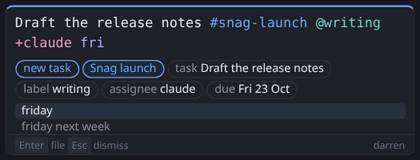
- The line: the task name first, markers in any order.
- Markers, highlighted as you type:
#project,@label,+person, a date at the end. - What will be filed, and where. A marker that can't be matched is struck through, with why.
- Completions. Tab takes one; only Tab completes a date.
- Enter files it. Esc closes the box and keeps the draft for 60 seconds.
- The signed-in account, or why the box cannot file.
Timer: Super+Alt+Q
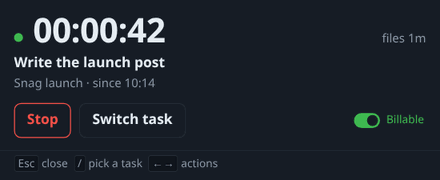
- The elapsed time. The tray icon is a red dot while it runs.
- The task and project.
- Start or stop.
- Switch task: the task picker. Type to filter, Enter starts.
- Billable, on by default. Set it while you work.
- Esc hides the window.
/or Ctrl+K picks a task.
Keybinds
| Keys | Does |
|---|---|
| Super+Q | Capture; again, switch task or note |
| Super+Shift+Q | Capture a note |
| Super+Alt+Q | Start or stop the timer |
| Super+Ctrl+Q | Timer window (Omarchy 4: Super+Ctrl+Shift+Q) |
From contrib/hypr/. On GNOME or KDE, bind the same commands.
The task line
| Type | Means |
|---|---|
#co | Project, matched fuzzily |
@bug | Label |
p1 to p4 | Priority |
+sam | Assign to a member |
~45m | Log time on a task |
friday | Due date, at the end |
\monday | Keep the word as text |
Paste or drop up to 5 files.
Idle: after 6 minutes
- Keep all (Enter): the time stays.
- Discard idle, carry on: a new entry starts now.
- Discard idle and stop: the timer stops.
- Move it: to another task.
Esc answers later. Nothing is discarded on its own.
Commands
| Command | Does |
|---|---|
snag status | What the timer is doing |
snag start, stop, toggle | Run the timer |
snag show | The timer window |
snag capture --note | The box, as a note |
snag tasks | Tasks as JSON |
snag retro | Time from git, dry run |
snag doctor | What works here |
snag whoami | The signed-in account |
Works with Basecamp, siftware.dev and Toggl
-

Basecamp
Connect your Basecamp account. Coming in 0.8.
Screenshot of Snag desktop with Basecamp to follow.
-

siftware.dev
Connect your siftware.dev account. Coming in 0.8.
Screenshot of Snag desktop with siftware.dev to follow.
-

Toggl Track
Connect your Toggl account. Coming in 0.8.
Screenshot of Snag desktop with Toggl Track to follow.